1. Bundle Adjustment Improvement
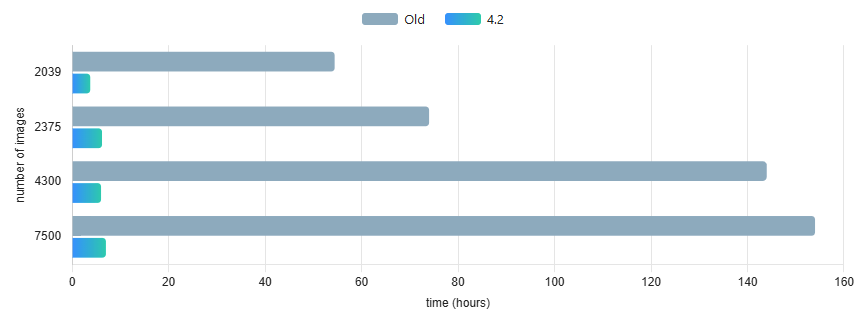
As hardware and data acquisition technologies continue to improve, surveying projects are generating increasingly large datasets. While projects with around 500 images are still common, datasets of 1,000–5,000 images are now becoming standard.
To keep processing times reasonable, 3Dsurvey 4.2 introduces new approaches and optimized algorithms directly into the core 3Dsurvey engine.
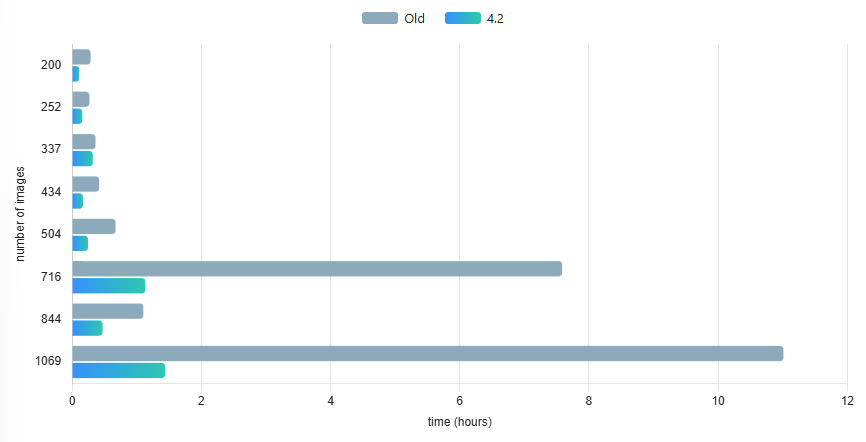
The latest release delivers major performance improvements on large datasets, especially when working with high image overlap. Depending on the project and configuration, processing can be up to 5–10× faster compared to previous versions.
3Dsurvey 4.2 also brings improved processing for large-sensor cameras such as Phase One P5, DJI L3, and similar systems.
On datasets with up to 1000 images main advantages come in the form of greater stability, optimization for oblique and Point-of-interest circle missions.
We have optimized both the processing algorithms and memory management to handle the large image sizes produced by these cameras more efficiently. This results in smoother operation, lower memory consumption, and significantly faster processing.
If large datasets or high-resolution imagery have been a bottleneck in your projects, 3Dsurvey 4.2 is designed to make processing faster and more reliable.
2. More CAD Functions
Essential CAD editing directly inside 3Dsurvey, reducing the need to switch to separate CAD software.
3 Point Arc Tool
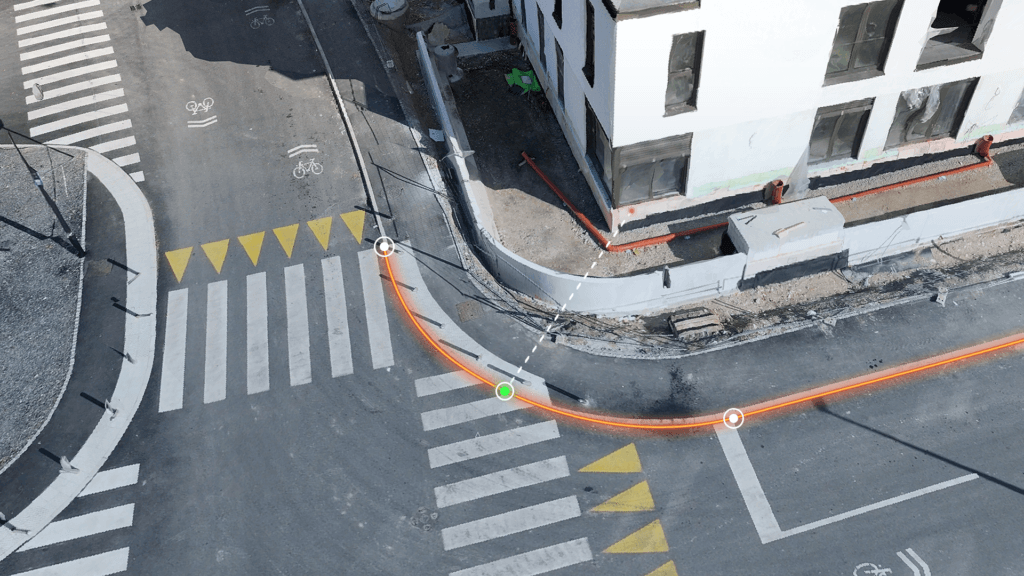
Create accurate 3D arcs directly in the CAD environment with the new 3 Point Arc tool.
Instead of approximating curves with multiple short straight lines, users can now define an arc using three points: the start point, end point and a point that defines the curve. This makes CAD drawing faster, cleaner and more precise.
The new tool is particularly useful for curved features and structures where representing a curve with multiple line segments would be unnecessarily time-consuming.
Join, Break, Explode
Expand your CAD workflow with three essential editing tools: Join, Break and Explode.
‘Join’ lets you merge multiple lines into a single polyline, making it easier to create continuous boundaries for tasks such as volume calculations. ‘Break’ lets you introduce a gap into an existing line, making it useful for features such as doors, windows and entryways. ‘Explode’ lets you separate a connected polyline into individual line segments for further editing.
Together, these tools provide greater flexibility when creating and editing CAD data directly in 3Dsurvey.
CAD snapshot + BackUp
Protect your CAD work with automatic snapshots and backup functionality.
CAD Snapshot automatically captures changes to your CAD data at configurable intervals, creating a history of your work. If you make an unwanted change, you can return to an earlier snapshot instead of having to recreate your work from scratch.
Snapshots also provide an additional layer of protection in the event of a software crash, computer shutdown or other unexpected interruption. All your CAD elements can be loaded from a backup file in the project folder to help recover your work.
3. Lidar Mesh & Multi-Source Mesh (Scan Module)
Create a single, complete 3D mesh by combining photogrammetry with SLAM and terrestrial laser scanning data.
The Multi-Source Mesh workflow brings exterior and interior data together into one aligned 3D model. Drone photogrammetry can capture large exterior areas, while SLAM or laser scanning can capture spaces and features that are difficult or impossible to reach with aerial imagery.
Combining these datasets into a single mesh also makes it easier to work with and extract CAD information from complex environments. Instead of working with separate meshes or relying solely on point clouds, users can work with a continuous 3D surface.
Multi-source mesh: combination of drone photogrammetry and SLAM point cloud
4. Pinhole Camera Support (Scan Module)
3Dsurvey 4.2 introduces seamless support for pinhole camera configurations in terrestrial laser scanners and SLAM units, significantly expanding compatibility with advanced capture systems.
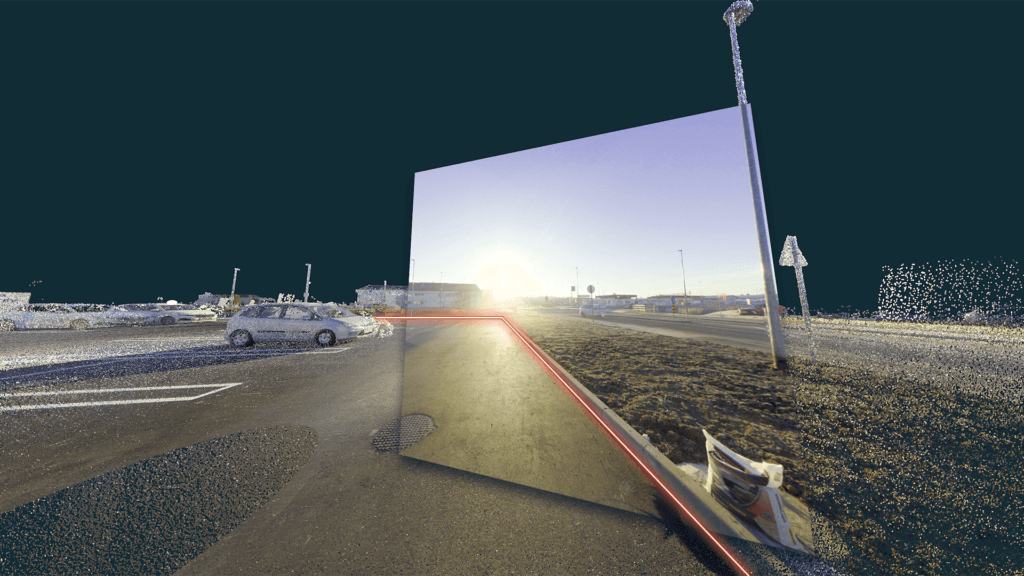
- Overlay images on point clouds – visualize your pinhole imagery directly on top of scanned data for richer, more intuitive insights.
- Draw with confidence – place points and lines directly on pinhole images with snapping to the point cloud.
- Faster, sharper CAD extraction – clearer context means better decisions and more accurate deliverables, in less time.
5. Spherical Images in 3Dsurvey Cloud
Bring more of your 3Dsurvey data into the cloud with improved visualisation and interaction in 3Dsurvey Cloud.
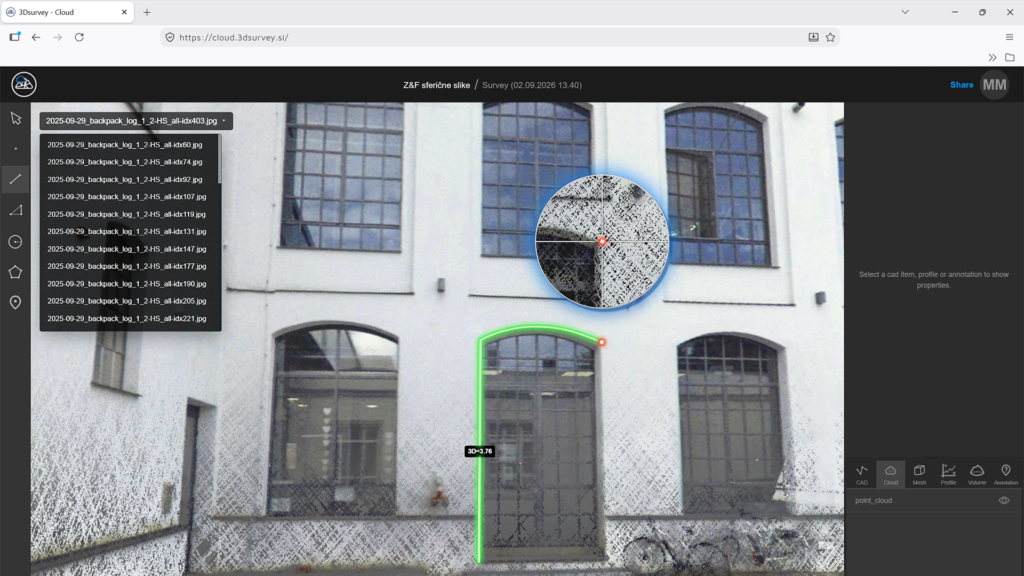
Spherical images captured by SLAM devices and terrestrial laser scanners can now be uploaded and displayed alongside the point cloud. The spherical imagery is aligned with the 3D data, allowing users to view the scene from the original panoramic imagery while simultaneously navigating the corresponding point-cloud information.
Improved snapping and CAD interaction also make it easier to work with and extract information from cloud-based projects.
Ready to go?
Version 4.2 is available to all existing users with an active 3Dsurvey Yearly Support & Upgrades extension, or active Subscription license.
Version 4.2 is also available for trial for all previous trial users and existing customers with inactive Support & Upgrades. Sign in to your account and extend your existing trial license.